
© 2024 fjorge. All rights reserved.
Is There a JS Library for Generating a PDF?

jsPDF is a Javascript library used to generate PDF files, that can be downloaded, printed or emailed.
Getting Started:
To start, declare a new instance of jsPDF.
var doc= new jsPdf();
You can pass parameters in the declaration - orientation, unit of measurement, and page size
var doc = new jsPDF("p", "pt", "letter");
This will set the orientation to portrait, the units of measure to points, and the size of the page to a standard letter piece of paper. With the document setup, we can move on to adding content to it. jsPdf allows for adding many different elements shapes, text, images, lines, etc. Let's cover text, lines, and images.
Set text style:
First set the color of the text by using the RGB value of the desired color.
doc.setTextColor(15,154,215);
This is an optional step, but you can choose to set the font, there are six to choose from. Simply pass the name and weight of the font as parameters.
doc.setFont("helvetica", "normal");
Setting the font size is relatively easy, as long as you set the unit of measure to points like we did above.
doc.setFontSize(18);
Set text content:
Now that the style of the text is set, we can actually set the text. The text can be any number of things, a string, a js variable, or if using jQuery the HTML of a DOM object.
doc.text(20,50,"Hello World!");
doc.text(20, 60, exampleVariable);
doc.text(20, 70, $("#example-text").html());
The first number is the x-position for the left edge of the text. The second number is the y-position of the top of the text.
Adding a line:
To add a line:
Much like adding text first the style of the line has to be set. We can set the weight of the line and its color.
doc.setLineWidth(2);
doc.setDrawColor(81,85,90);
With the style set, the line can be added. It takes four parameters X-position1, Y-position1, X-position2, Y-position2. The first pair sets start of the line, and the second pair sets the end of the line.
doc.line(20, 80, 575, 80);
Adding an image:
The first step of adding an image is to generate a data URL, jsPDF recommends this site to generate one. Go to the link and upload a file. Then copy the output into a variable in your js file.
var imageData ="data:image/png;base64,iVBORw0KGgoAAAANSUhEUgAAAU4AAAB…;
Then add the image:
doc.addImage(imgData, 'PNG', 450, 50, 110, 28);
The first parameter is the dataURL, next is the file type of the original image and thus the encoding, the first number is the x coordinate for the left edge of the image, the second number is the y-position of the top of the image, the third number is the width of the image, and the last number is the height of the image.
Here is an example of what can be done, using only these three elements.
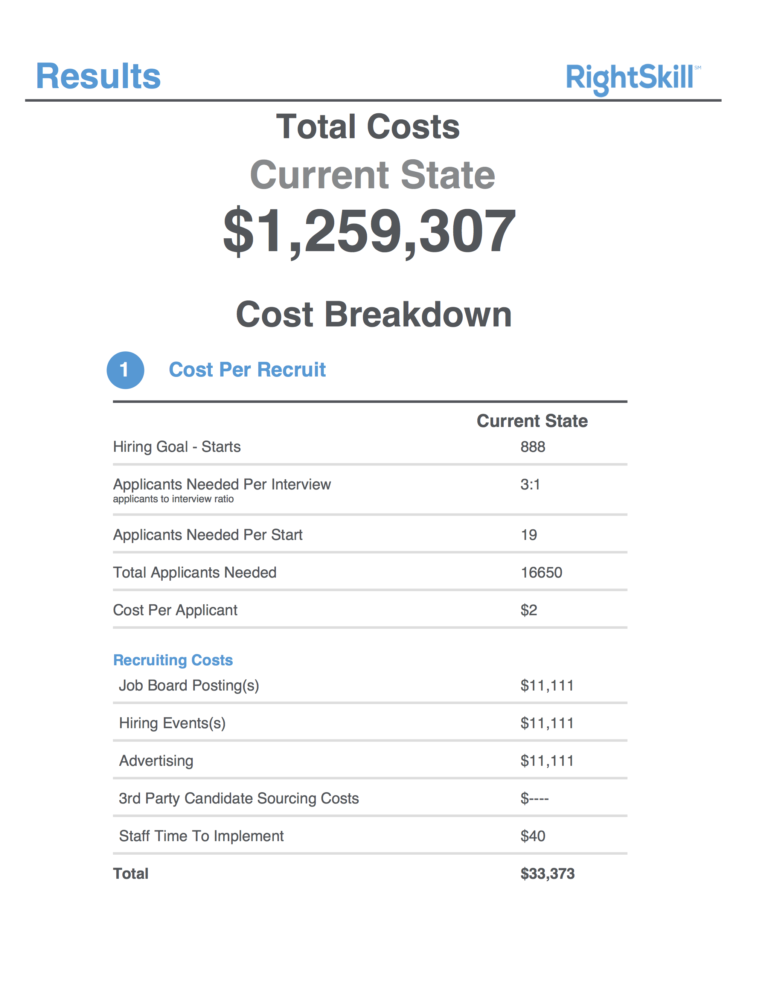
Adding other elements follows a similar pattern to these three. To explore what else can be done check out the jsPDF site for demos and documentation.
Ready to start a project?

